Placement & Foster Care
On this page
| For step-by-step instructions, see Caseworker Guide: Placement. |
|
Target-state design page: the screens below are the design engagement’s
target mockups, not the as-built system. Built today: identity-free placement
matching (child age, Indian Child Welfare Act — ICWA — compliance, and
sibling-group-size filters over license status, occupancy, and age range,
with kinship-licensed homes sorted first and over-capacity placement
refused), the foster home record (licensure, capacity, training-hours log,
documents), and the flat sortable placements list. Design targets: a
geographic radius, sex/special-needs filters and identity pre-population
(#837 tracks
the identity-based variant), tribal-affiliation surfacing beyond the ICWA
boolean, a kinship section with known relatives, placement history and
contact notes on the home record, proactive expiration/training alerting
(the foster parent portal is Phase 11), sibling row-grouping, the per-child
timeline with gap analysis, and automated hearing/review scheduling plus
deadline monitoring (the |
The Placement module manages the full lifecycle of foster home licensing, placement matching, and placement history. It tracks children across all placement types — licensed foster homes, kinship placements, group homes, and residential facilities — and ensures placement stability is monitored and reported.
Primary users: Caseworkers, Supervisors (the placement navigation admits caseworkers, supervisors, and administrators)
Screen 1: Placement Matching
When a child needs to be placed, the worker searches for available placements filtered by child-specific needs. The system displays real-time capacity across licensed homes, kinship options, and other placement types; a configurable geographic radius is a design target.
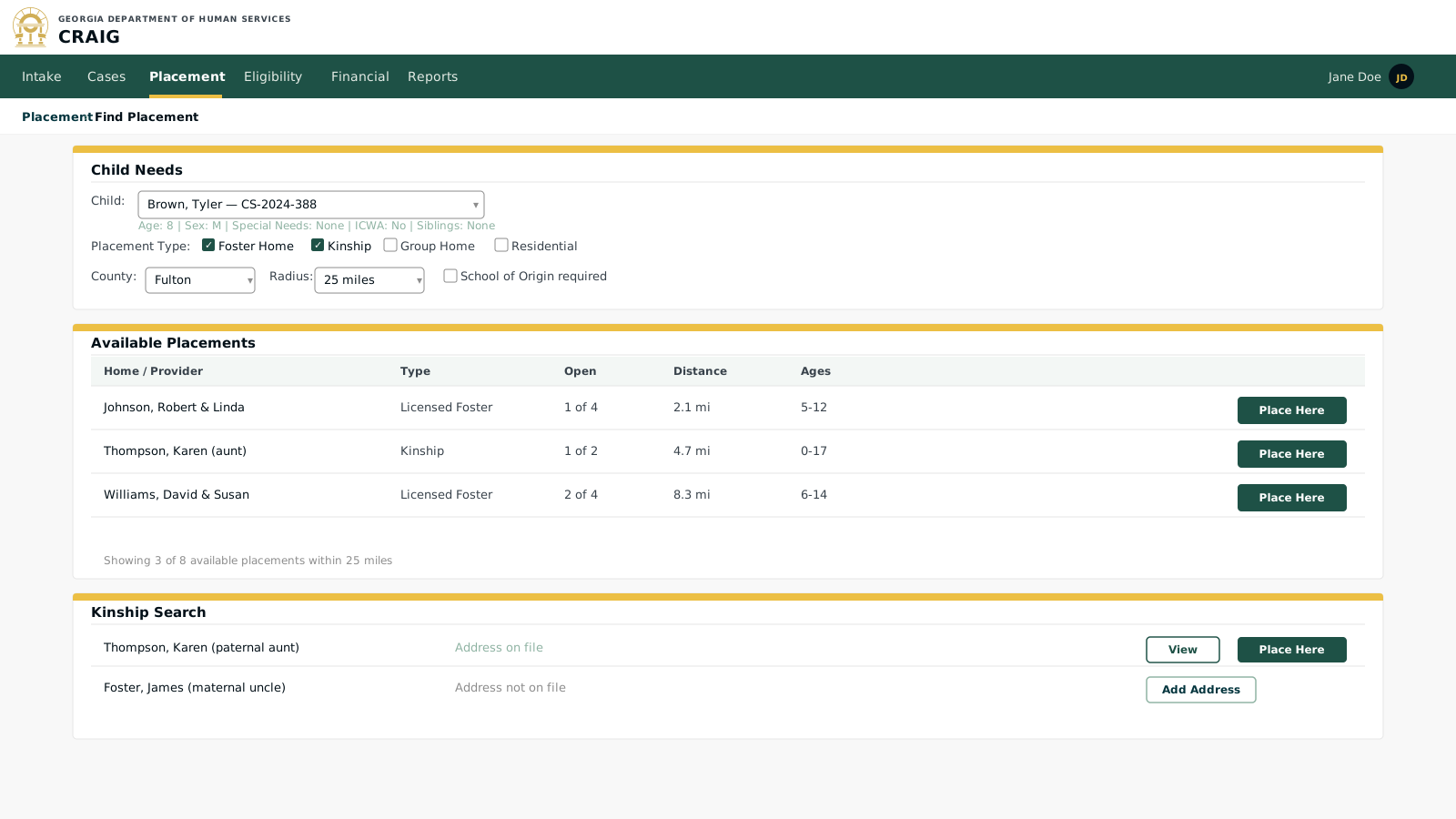
Key elements:
-
Child-specific filters: the design target pre-populates the child’s age, sex, and any special needs. As built, matching is deliberately identity-free — the worker enters age, ICWA, and sibling-group-size filters manually (#837 tracks the identity-based variant).
-
ICWA flag: as built, an ICWA-required search narrows results to ICWA-compliant homes. The design target adds tribal-affiliation surfacing (known tribal placements, tribe-affiliated kinship options) and tribal-notification flagging for non-tribal placements.
-
Real-time capacity: available slots pull from the live foster home database; a placement made elsewhere removes the slot in real time.
-
Kinship preference: as built, kinship-licensed homes sort first in the results, consistent with federal kinship placement preference requirements. The design target adds a dedicated kinship section surfacing known relatives (a separate per-case kinship-options module exists outside matching).
Screen 2: Foster Home Record
Each licensed foster home has a full record covering licensure, current capacity, and training hours today; placement history and contact notes on the record are design targets.
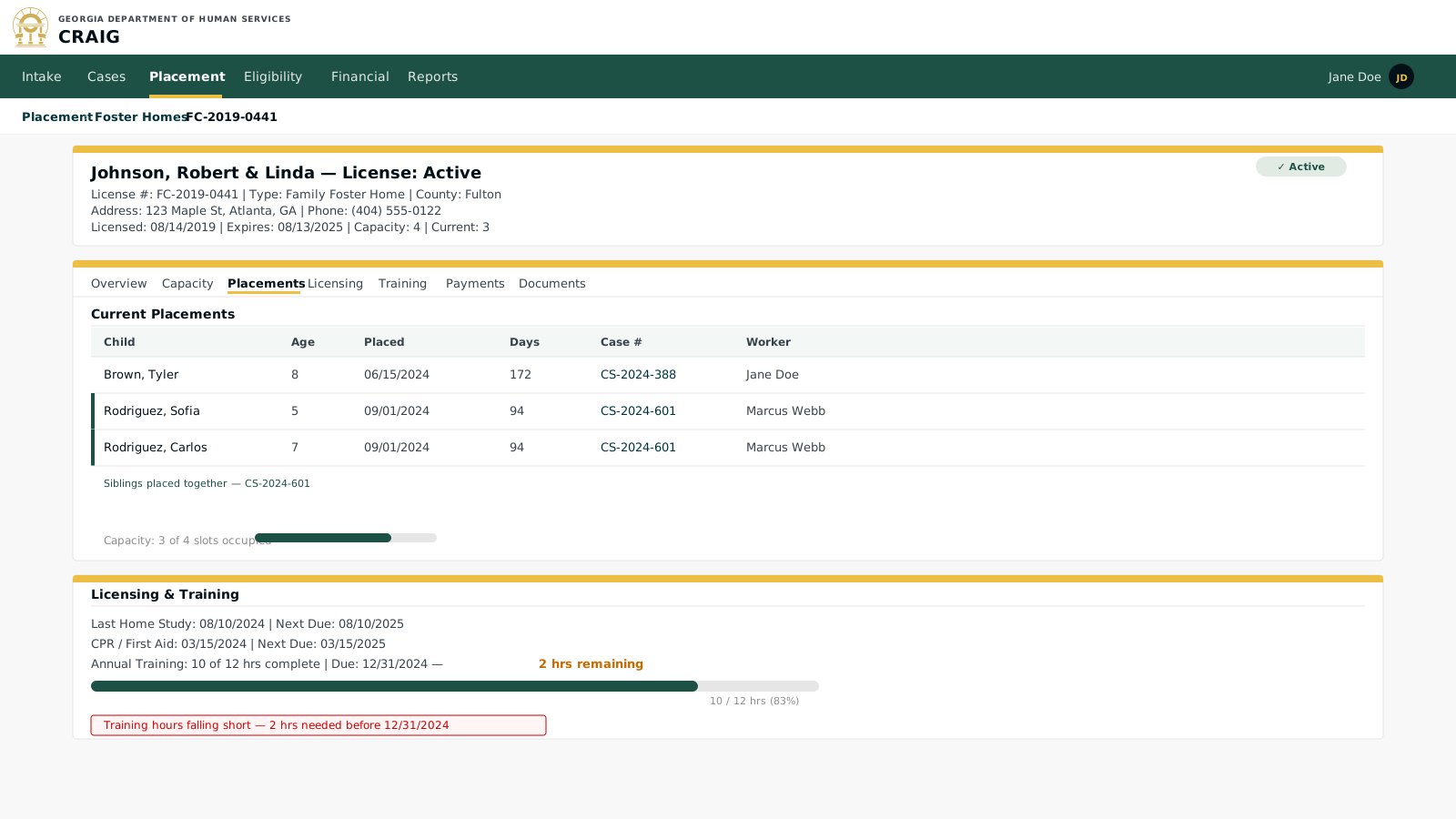
Key elements:
-
Capacity tracking: current vs. licensed capacity is always visible; the system prevents placements that would exceed licensed capacity.
-
Expiration monitoring: the design target has the Rules Engine flag homes approaching license expiration, CPR renewal, or training-hour shortfalls and alert the responsible worker proactively; as built, the license expiration date is displayed on the record without alerting.
-
Sibling placement visibility: the design target groups siblings placed together so the worker sees the full household picture; as built, the record carries an accepts-sibling-groups flag and matching takes a sibling-group-size filter, with no placed-children listing on the home record yet.
-
Training tracker: hours are logged on the home record today; tracking against an annual requirement and alerting the foster parent through the (Phase 11) foster parent portal are design targets.
Screen 3: Placement History
The placement history is designed as a chronological per-child timeline including removal details, judicial findings, and permanency goal, and as the primary source for AFCARS placement episode reporting (extraction pending #949).
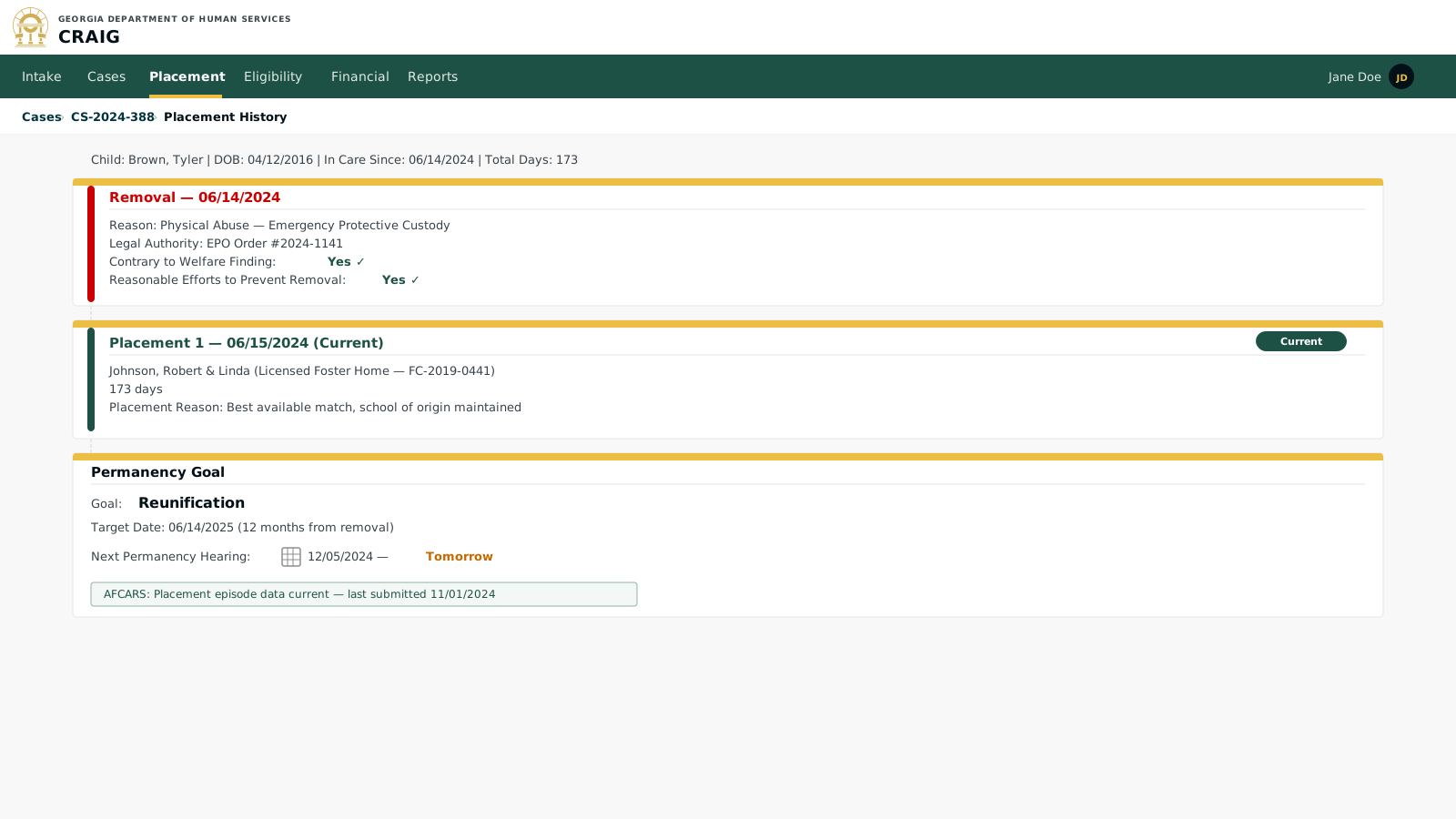
Key elements:
-
AFCARS data: removal reason, placement type, and duration are the primary Adoption and Foster Care Analysis and Reporting System (AFCARS) data elements; in the target design this view feeds the Reporting module’s AFCARS submission (extraction is #949, not yet built).
-
Judicial finding capture: contrary-to-welfare and reasonable-efforts findings are recorded at removal and must be confirmed within 60 days; proactive deadline monitoring and alerting is a design target (the store computes the days-from-removal figure passively).
-
Timeline view: the design target shows a child’s placements sequentially with gap analysis to identify placement instability; as built, the placements screen is a flat sortable table with status filter tabs.
-
Permanency goal link: in the target design the permanency goal drives automated hearing and review scheduling visible in the Case Management module; as built, hearing dates are entered manually on court orders and no automated scheduling exists.