Intake & Investigations
On this page
| For step-by-step instructions, see Caseworker Guide: Intake and Referrals and Public Reporting Guide. |
|
Target-state design page: the screens below are the design engagement’s target mockups, not the as-built system. Built today: the New Referral form (reporter information, admin unit, worker-selected priority, screen-in decision, ICWA flag — victim/perpetrator allegations are added on the referral detail page as a second step), the investigation worklist (status tabs, Mine/All-workers filter, search, sortable columns including the response-due date), and the safety assessment (threats and protective capacities as free-form JSON, the advisory Rules Engine decision, the worker override with reason, and the rule-set identity frozen onto the assessment row). Design targets: Rules-Engine-suggested response priority, the tribal-notification task queue behind the ICWA flag, perpetrator-relationship capture, conditional mandated-reporter field requirements, timeliness glyphs and overdue surfacing, sibling row-grouping, unit/district filter dimensions, structured per-item threat controls, and displaying the rule-set attribution in the UI. |
The Intake module covers the full lifecycle of a child abuse and neglect referral — from the initial hotline call through investigation assignment and safety assessment. It is the entry point to the Comprehensive Child Welfare Information System (CCWIS) for new cases and is the primary source of National Child Abuse and Neglect Data System (NCANDS) data.
Primary users: Caseworkers, Hotline Staff, Supervisors
Screen 1: New Referral / Hotline Intake
When a hotline call is received, the worker completes a structured intake form capturing reporter information, alleged victim and perpetrator details, the nature of the allegation, and a response priority decision. The form enforces required fields and flags ICWA-applicable cases for immediate tribal notification tracking.
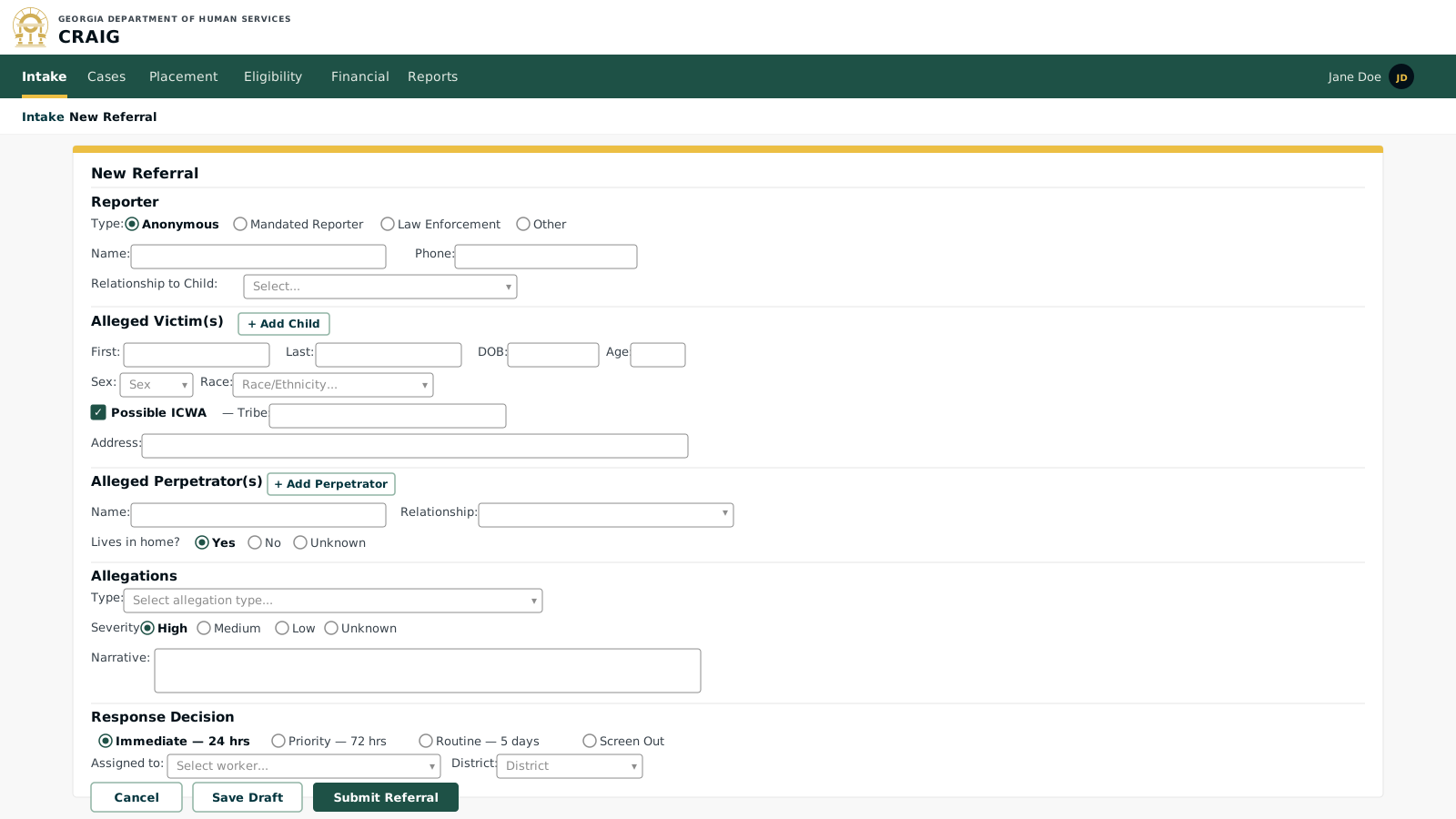
Key elements:
-
Reporter Type: classifies the reporter (mandated, professional, anonymous, self-report, law enforcement); anonymous reports are accepted. The design target is for the type to drive conditional field requirements; as built, reporter identity fields are optional regardless of type.
-
ICWA flag: marks the referral as Indian Child Welfare Act (ICWA)-applicable. As built this is a stored flag carried on the referral and its events; the tribal-notification task queue and ICWA case-lock are design targets.
-
Perpetrator relationship: tracks whether the perpetrator lives in the home, which affects safety planning.
-
Response Priority: the worker selects immediate / 24-hour / 72-hour. The design target is a Rules-Engine-suggested priority with a documented override rationale; as built, the selection is manual.
-
Screen Out: a screened-out referral is retained in the system for pattern detection but does not generate an investigation.
Screen 2: Investigation Worklist
Caseworkers see their own assigned investigations; supervisors and administrators see all of them (Georgia’s authorization policy is realm-flat for supervisors). Timeliness is tracked against the response priority set at intake. Overdue items are surfaced prominently.
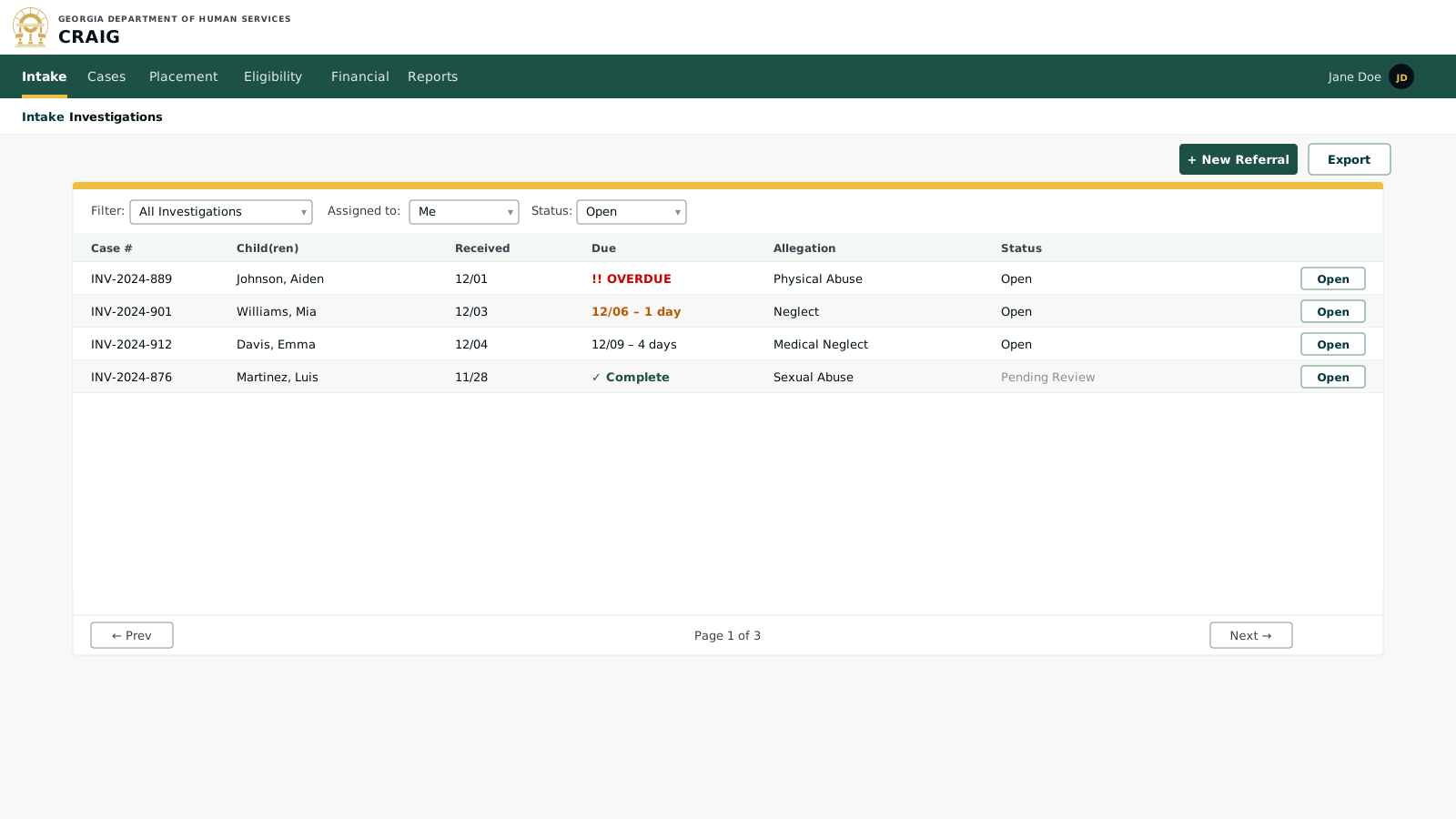
Key elements:
-
Timeliness indicators: color-coded and icon-coded for at-a-glance status; ⚠ overdue, ● due soon, ○ on track, ✓ complete.
-
Multi-child cases: sibling cases are displayed together under one referral number.
-
Pending Review status: investigation complete but awaiting supervisor sign-off before the case is officially closed or transferred.
-
Filter controls: the design target adds unit and district filter dimensions; as built, the filters are status, Mine/All workers, and search.
Screen 3: Safety Assessment
Upon initial contact, the worker completes a structured safety assessment. The Rules Engine evaluates the responses and produces an automated safety decision in the jurisdiction’s own vocabulary (Georgia is binary SAFE / UNSAFE; Texas adds CONDITIONALLY_SAFE — the outcome set belongs to each jurisdiction’s ruleset). The worker records their professional judgment and documents any safety plan.
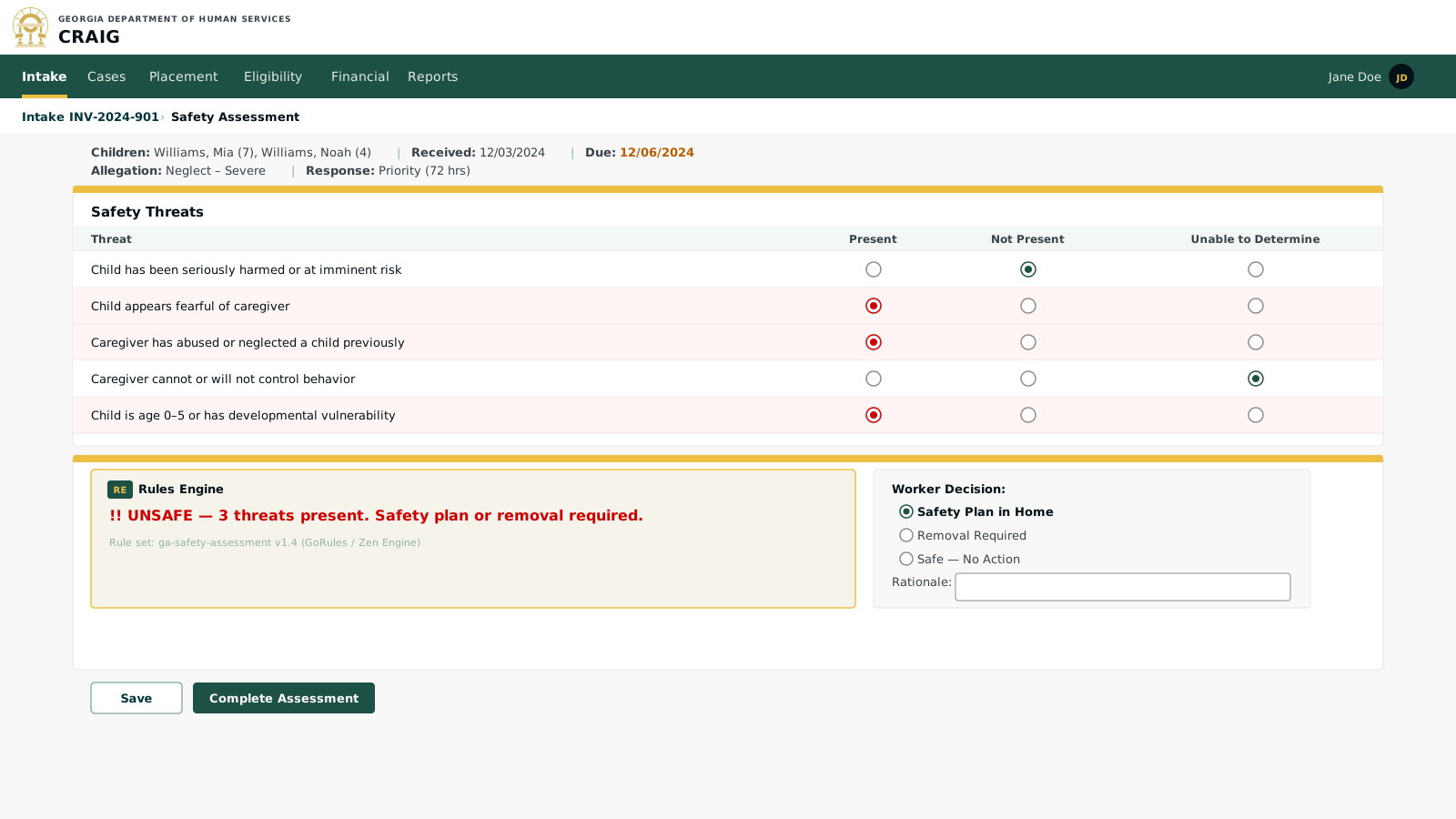
Key elements:
-
Structured threat items: jurisdiction-configurable via a GoRules JSON Decision Model (JDM) ruleset; each state can add, remove, or re-weight threat items to match its structured-decision-making (SDM) framework without code changes. (Per-item form controls are a design target; the built form takes the threat and protective-capacity sets as free-form JSON.)
-
Rules Engine decision: the GoRules Zen Engine evaluates the threat responses and produces a safety classification; the rule set version is recorded with the assessment for audit purposes.
-
Worker override: the worker’s professional judgment is always the recorded decision; the rules engine output is advisory and informational, not binding.
-
Rule set attribution: the rule set name and version are recorded on the assessment row for auditability, making plain-language documentation straightforward per 45 CFR § 1355.53(a)(2). (Displaying the attribution in the UI is a design target.)